View and Editing of table structure
Analysis and rapid modifying of table structure are necessary tasks during analysis and development activities. Teide provides effective functionality.
In right part of application you can click "Fields" tab to see information about table fields.
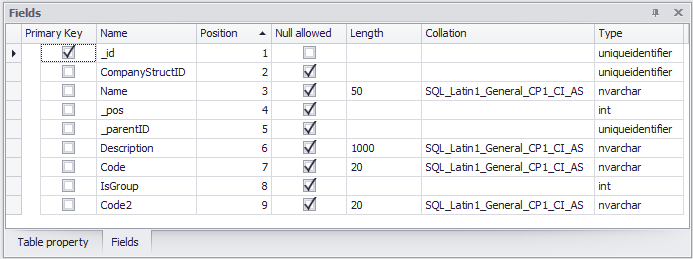
As soon as you select table, fields of the table are showed in Fields window. Even in preview mode Fields can be edited.
By clicking table in Field window, "Table structure" tab in Toolbar appears.

You can rename field, change it type and length, property if null allowed in the field, and property of including field to Primary Key.
Rename and change of field properties
Change name of field, and click Save changes to rename field in the table.
The same as name, you can correct field type, length and collation of string fields.
Save changes
The saving of changes activates all activities with field properties, including renaming of fields, changing field types, field length and collation, ability to use null value and collation, including of field to Primary Key.
Decline changes
All made changes reverts to initial data, changes are not made in the table.